
New AI tools are increasingly able to build small interactive experiences or automate everyday tasks without requiring any programming. For teachers, this opens up two very different but equally useful possibilities: improving what students see and interact with in lessons, and reducing the time spent on preparation and administration. These are much easier to use than most vibe coding tools and are largely self-contained. Both are free for educators to use.
Canva Code: adding interaction to learning materials
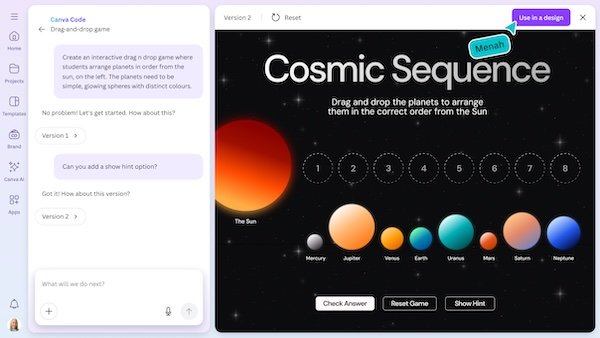
Canva Code focuses on creating interactive elements inside Canva designs. Instead of static slides or worksheets, teachers can add simple activities that students can click, drag, or explore during a lesson.
How it can be used
A teacher might type:
- “Create an interactive multiplication quiz with 10 questions”
- “Add a draggable number line for students to explore positive and negative numbers”
- “Make a simple true or false quiz for this slide”
Canva then generates an interactive element directly inside the presentation or worksheet. Students can engage with it on the board, on a shared screen, or on their own devices.
Where it works best
- Making lessons more interactive without additional software
- Turning worksheets into digital activities
- Adding engagement to presentations or revision tasks
- Supporting whole-class discussion using the board
This tool is primarily about student experience. It enhances how learning materials look and behave, rather than automating behind-the-scenes work.
Google Opal: automating teaching workflows
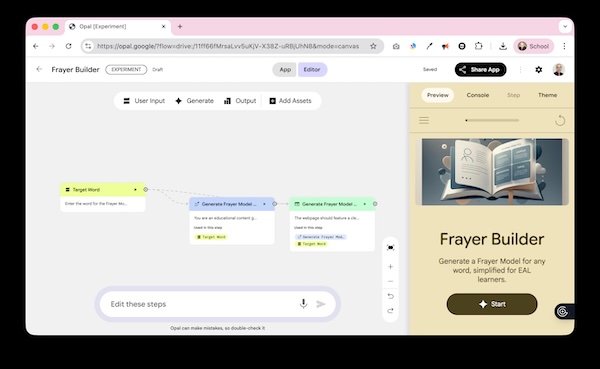
Google Opal is less concerned with presentation and more focused on process. It allows teachers to describe a task once and then reuse it repeatedly. The result is a workflow that can save time across planning, assessment, and communication.
How it can be used
A teacher might write:
- “Summarise this article for students aged 10 to 11”
- “Extract key vocabulary and create definitions”
- “Draft a short email to parents explaining the lesson focus”
Once set up, the same steps can be applied again and again. Each time a new article, video transcript, or document is added, Opal repeats the process automatically.
Where it works best
- Lesson planning and resource preparation
- Simplifying complex texts
- Creating vocabulary lists and summaries
- Drafting communications or planning documents
- Reducing repetitive administrative work
Two nice examples of this are this Phonics Builder and this Frayer Builder
This tool supports teachers by handling routine tasks, allowing more time to focus on teaching and student support.
Choosing the right tool
The choice depends on what problem you are trying to solve.
