
It started, as it often does, with a simple lesson objective: teaching direct speech and speech marks. Teaching my Year 2s means I am constantly looking for ways to make abstract grammar concepts tactile, visual, and, above all, fun. I wanted something punchy for the interactive whiteboard, which could be accessed independently by our early finishers, or as a fun extra activity in between lessons. Interestingly, contrary to what you might think my classroom does not have iPads on every table and constant tech integration. I am always very intentional when using technology or adding EdTech into the Year 2 classroom, and this was such a moment. Whilst our main English lessons will introduce and cover the bulk of the objective, I wanted a drag-and-drop activity where the children physically place the speech marks.
Instead of using a worksheet(which I am NOT a fan of) or searching for a pre-made tool that almost did what I wanted, I decided to build one and see how long thi would take.
At our school, we currently allow teachers to use two main AI platforms for generation of content: Canva (in this case specifically Canva Code for Me) and Google’s Gemini 3.0. There are massive reasons behind this regarding privacy, data protection, and safeguarding, but I will write a whole separate post about that later.
For now, I wanted to compare the “one-shot” power of these two platforms. If I feed them the exact same prompt, with maybe one or maximum two follow-up tweaks, who builds the better interactive whiteboard game?
The results are live! You can play with them both here:
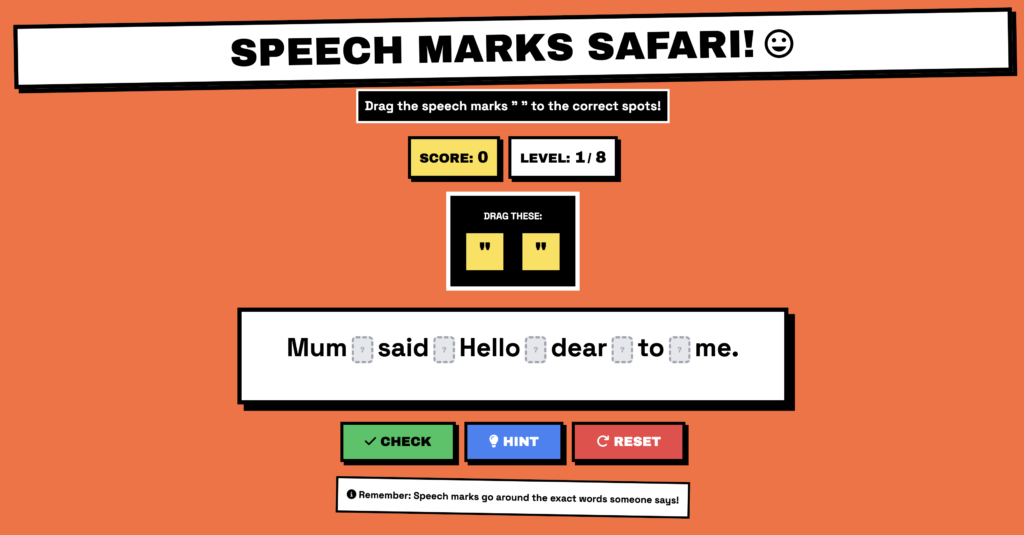
- Canva’s Version: Speech Marks Safari
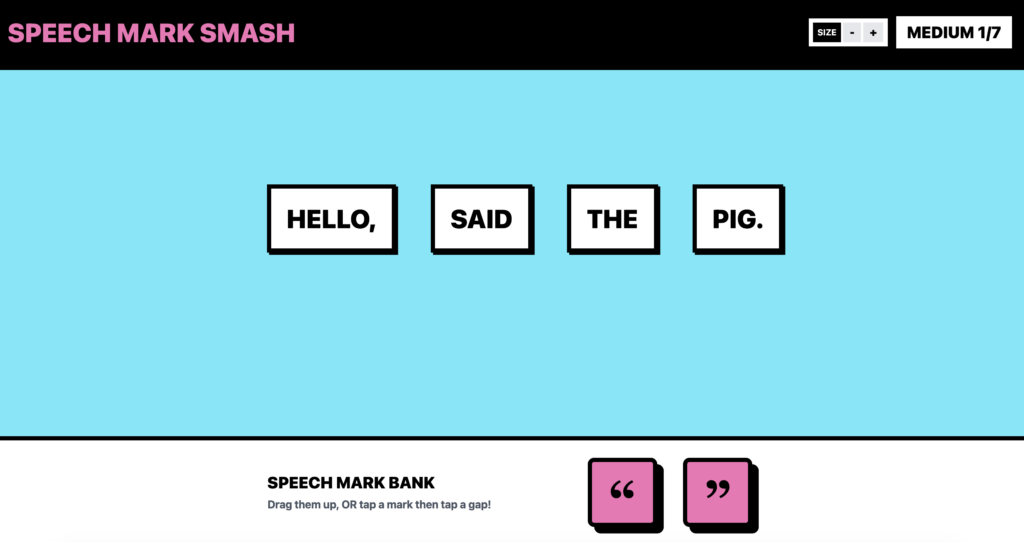
- Gemini’s Version: Speech Mark Smash
Let’s break down how we got here and think out loud through the steps.
The Master Prompt
To give both AIs a fair fight, I needed a prompt that was specific about pedagogy, design, and functionality. I tidied up my original thoughts into a more structured prompt that you can steal for your own projects:
Role: You are a lead developer at a top edutainment company creating learning games for the classroom.
Task: Create an amazingly fun, easy-to-use game for Year 2 students to teach them about speech marks and direct dialogue. The core mechanic is dragging and dropping speech marks into the correct spots within a sentence.
Design & UI: I want a bold, brutalist visual style (think thick borders, clean graphics, and high contrast.) It must have a drag-and-drop interface optimised for an interactive whiteboard.
Technical Details: The game can be written in any web framework as long as it works flawlessly (if unsure, propose 3 and I will choose one).
Gameplay Logic: The sentences should be challenging but age-appropriate. To ensure students really think about placement, place drop target boxes between every single word. Once the speech marks have been correctly placed, highlight the spoken part of the sentence in a bold, brutalist yellow to reinforce the learning. Make it interactive, highly polished, and responsive.
Challenger 1: Gemini 3.0 & “Speech Mark Smash”
With Gemini, the process felt very much like a rapid-fire pair-programming session. It grasped the core concept immediately, but I wanted to push the functionality a bit further for differentiation and accessibility.
The Chat Highlight:
- Me: This is great! Let’s add the option to have 3 levels of word complexity for high ability readers. Also add a way to increase or decrease the font size so it fits different screens.
- Gemini: (Updated the code with difficulty tiers and font scaling).
- Me: When I reduce the font size, can I see the sentence wrapping adjust to my screen size as well?
- Gemini: (Refined the CSS/JS to ensure perfect responsive wrapping on the whiteboard).
Challenger 2: Canva Code for Me & “Speech Marks Safari”
Canva took a slightly different approach, leaning heavily into its design-first nature. It instantly conceptualised a whole theme and gamified it right out of the gate. For a one-shot prompt, getting that level of cohesive design and functionality was incredibly impressive. However, things got a bit comedic when we started talking about UI assets.
The Chat Highlight:
- Canva: I’ll create a fun, educational game… I’ve created “Speech Marks Safari” – a bold, brutalist-styled educational game! Key Features: Drag & Drop, Bold Brutalist Design, Visual Feedback…
- Me: The question mark placement shows us where they go. Have the drop target boxes between every word so the children really have to think about where the speech marks go. Replace emojis with icons. Modern and clean.
- Canva: I’ll replace the emojis with clean, modern Font Awesome icons throughout the game! (Proceeds to generate code that still inexplicably relies on emojis).
- Me: I am still seeing emojis, do you have access to icons instead of emojis?
- Canva: You’re absolutely right! I apologise for the confusion. I don’t have direct access to icon libraries… Let me replace all the emojis with clean SVG icons instead… (Still fails to remove the emojis).
My Reflections: Which Tool Wins?
Looking back at this experiment, it’s fascinating to see how the underlying architecture of these two platforms dictates their output.
My goodness, did Canva do an excellent job on that first shot! If you want a highly styled, gamified experience instantly and don’t mind a few quirky UI workarounds (like the stubborn emojis), Canva is fantastic for rapid, engaging prototyping.
But when you are standing at the front of the class, you need the mechanics to be bulletproof. Gemini 3.0 acts like a pure developer. It is easy to criticise an AI for lacking creative flair compared to a design tool, but when it came to executing logic, Gemini was flawless. Having that precise control over the responsive text wrapping, the difficulty tiers, and those specific drop-zones between every single word makes Speech Mark Smash the natural winner for actual interactive whiteboard use.
The children loved the brutalist yellow highlights, and dropping the speech marks exactly where they belonged turned a standard grammar lesson into a genuinely interactive puzzle.
If you’d like to learn more about Vibe coding, or bring training to your teachers at school. Why not reach out! We provide consultation, training, and guidance for schools, educators and families looking to innovate!
Note: This post was cross posted to sethideclercq.com/blog
