
Teaching young learners to code often sparks two very valid concerns for educators and parents alike: screen time quality and cognitive overload. When children aged 4 to 8 sit in front of a screen, the difference between passive, ad-filled digital consumption and structured computational thinking comes down to interface design and intentional pedagogy.
Many free coding websites rely on third-party banner ads, chaotic interfaces, or open sandboxes that invite aimless clicking rather than deliberate problem-solving. CodeMonkey’s early-years pathway; anchored by CodeMonkey Jr. (pre-reader) and Beaver Achiever (Grades 1–2 / KS1) takes the opposite approach: a distraction-free, ad-free walled garden that introduces computational logic through bite-sized, sequential scaffolding.
CodeMonkey functions as a single entry to many modules or courses.
Here is a practical breakdown of how these two foundational modules(courses) build authentic problem-solving skills, how they scaffold learning without overwhelming young minds, and what the platform offers teachers and homeschooling parents behind the scenes.
1. CodeMonkey Jr.: Visual Logic for Pre-Readers
Target Stage: Pre-K to Kindergarten / Reception to Year 1
Key Concepts: Algorithms, Directional Sequencing, Counting, Loops, Conditionals, Procedures
For early years learners, the barrier to computing is rarely logic. It is literacy. CodeMonkey Jr. bypasses text entirely, using an icon-based visual interface where arrows, action blocks, and auditory cues form the entire programming syntax. Not unlike ScratchJr the blocks have icons. The main difference is that CodeMonkey provide guided structure and lessons whereas ScratchJr is an open Sandbox with limited customisation available. (Unless you use AmberJr of course to create custom ScratchJr projects)
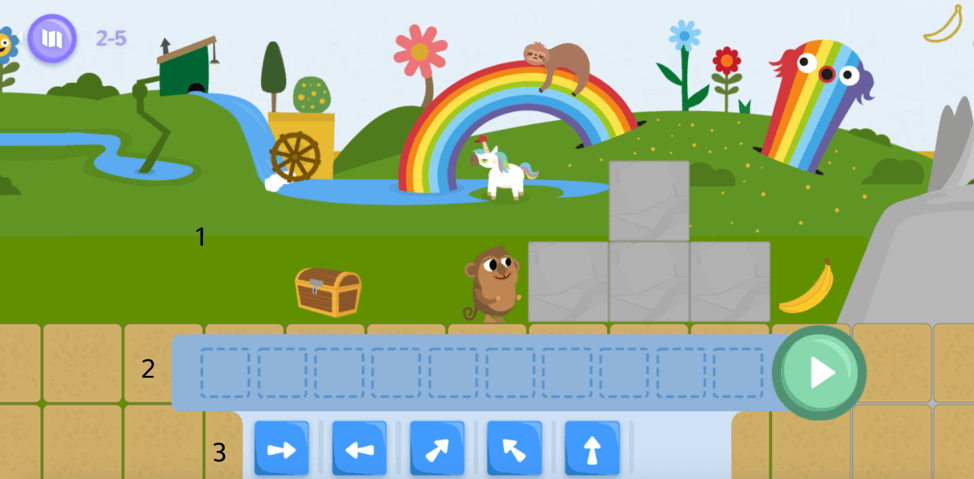
Reducing Cognitive Strain While Debugging
A common classroom hurdle with young learners is debugging: when a character fails to reach the target, children struggle to identify which instruction caused the fault.
CodeMonkey Jr. solves this with a synchronised execution tracker: as the monkey runs the program, a visual pointer glides across the student’s sequence bar in real time. If the monkey misses a jump or steps into empty space, learners see the exact block that misfired. This shifts the experience from trial-and-error guessing to visual tracing, a foundational element of computational thinking.
Sophisticated Logic in a Simple Container
Most pre-reader coding tools stop at simple linear sequencing (move forward, turn right). And that’s ok, we’ve got to start somewhere but CodeMonkey Jr. introduces concepts usually reserved for older students in a way that makes sense to even our very youngest learners:
- Conditional Loops: Moving toward an objective until a specific condition is met (e.g., looping movement until a coloured flower appears).
- Colour- and Shape-Coded Procedures: Reusable routines represented by both distinct colours and geometric shapes, ensuring the interface remains fully inclusive for colourblind learners. Students define a subroutine once and invoke it multiple times, building early mental models of procedural abstraction.
2. Beaver Achiever: Bridging Icons to Text-Based Blocks
Target Stage: Grades 1–2 / Key Stage 1
Key Concepts: Hybrid Block Syntax, Repeat Counters, Nested Logic, Summative Problem Solving
When students develop early reading fluency, they need a bridge between picture-based blocks and standard block coding platforms like Scratch. Beaver Achiever provides that transition through a structured narrative: helping a beaver construct dams using increasingly complex logic. Whereas Scratch and OctoStudio are two excellent platforms for our students, they’re still very much open ended sandboxes and unless you’ve got motivated and passionate educators leading the lessons with Computational understanding this can mean it’s less structured which leads us to the main pitfall.
Curated Workspaces Prevent Overwhelm
A frequent pitfall in early-primary computing lessons is the “infinite toybox” problem. When given access to 50 different blocks at once, young students spend lesson time dragging random blocks onto the canvas rather than solving the puzzle.
Beaver Achiever counters this by providing a restricted block repository. Each challenge only provides the specific logical operators required for that task. This bounded problem space forces students to focus on logic, efficiency, and sequence rather than trial-and-error exploration.
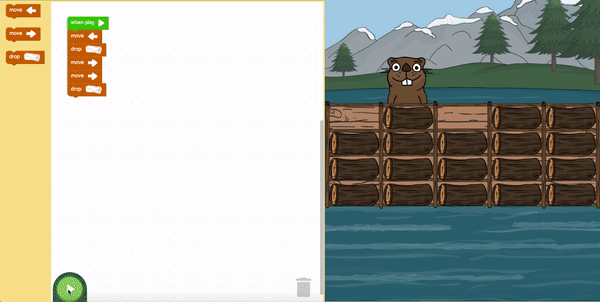
Multi-Sensory Scaffolding: The Audio Assistant
In any Year 1 or 2 classroom, reading levels vary widely. Beaver Achiever includes an integrated audio reader (represented by a sleeping parrot icon). When clicked, the tool reads any block’s text aloud to the child. This simple accessibility feature allows struggling or emerging readers to access the computing curriculum independently without requiring constant one-on-one adult intervention.
Pedagogical Strength: Spiraled Learning and Code Efficiency
A major strength across both modules(courses) is the deliberate spiralling of the curriculum. Concepts are not introduced in isolation and discarded; they return in altered contexts:
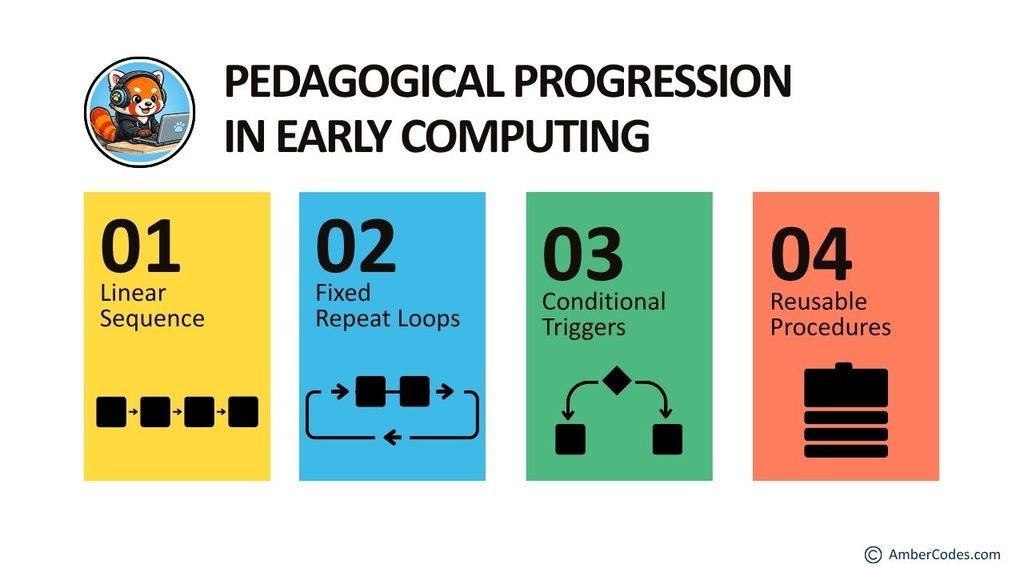
- Repetition with Variation: Students learn linear sequencing first, use those sequences inside fixed loops, apply those loops to conditional triggers, and finally encapsulate them inside named procedures.
- Efficiency Over Merely “Working”: CodeMonkey uses a 3-star rating system based on code economy. A program that solves the puzzle using brute-force repetition receives 1 or 2 stars, accompanied by prompt feedback: “Try shorter code.” This encourages students to re-examine working solutions and optimise them using loops, mirroring real-world software development practices.
The Teacher Dashboard: Actionable Assessment Without Guesswork
Both modules are backed by a robust teacher management backend, making the platform particularly valuable for non-specialist classroom teachers and homeschooling parents:
- Full Classroom Lesson Plans: Both courses include downloadable slide decks, unplugged computing activities, and curriculum mapping (aligning with CSTA and international computing standards). Teachers do not need a computer science background to lead these units.
- Granular Tools: When a student earns fewer than 3 stars, the teacher dashboard allows you to open their exact submission and see their code. You can see precisely where a student added redundant blocks, providing a clear launching point for 1-to-1 coaching.
- Integrated Summative Quizzes (Beaver Achiever): Beaver Achiever introduces formal, self-grading quizzes that test sequencing and logic under assessment conditions, exporting directly to a CSV gradebook.
- Progress Pacing: Teachers can lock or limit module progression, ensuring fast finishers do not race ahead through gamified levels before the class has consolidated key concepts.
Safe, Purposeful Screen Time
With current discussions focussed on reducing passive screen time in schools as well as at home, tools like CodeMonkey Jr. and Beaver Achiever demonstrate what active, productive digital learning looks like.
By removing ads, visual clutter, and unnecessary distractions, the platform keeps the student focused entirely on spatial reasoning, logic, and resilience through debugging. Whether implemented across a primary school computing sequence or used at home, it provides young learners with a structured, step-by-step entry point into authentic computer science.
You can check out CodeMonkey by yourselves here: https://www.codemonkey.com/
Full Disclosure; Whilst this article was in no way sponsored by or commissioned by CodeMonkey. The company did give me full Premium access to their platform to enable recording of the embedded videos linked above.
All views and opinions are my own and have not been edited, approved, or changed by CodeMonkey.
Note: This article was first posted on SethiDeClercq.com and cross-posted on ReadySetCompute.com